English
A flow meter output signal is the way a meter passes its reading to another system: a PLC, a SCADA screen, a paperless recorder or a cloud platform. Picking the wrong output is one of the most common reasons a new meter "works on the display" but shows nothing, or the wrong number, in the control room. Most industrial flow meters offer several outputs, so the question is which one fits the job. The short answer: use 4-20mA for flow rate, pulse for totals, Modbus RS485 when one cable must carry several values, and GPRS when there is no cable at all.
| You need to… | Use this output |
|---|---|
| Show or control flow rate in a PLC or DCS | 4-20mA |
| Count total volume or mass (batching, billing, fuel use) | Pulse / frequency |
| Read flow rate, total, temperature and alarms over one cable | Modbus RTU over RS485 |
| Keep using an existing HART or Profibus network | HART or Profibus |
| Trigger an alarm or a valve at a set point | Relay |
| Monitor a remote site with no power or cable | Battery meter with GPRS, or a gateway |
A flow meter output signal is an electrical signal, analog or digital, that represents a measured value such as flow rate or totalized flow. The transmitter converts the sensor reading into that signal so another device can read it without anyone looking at the display.
Five output types cover almost every installation:
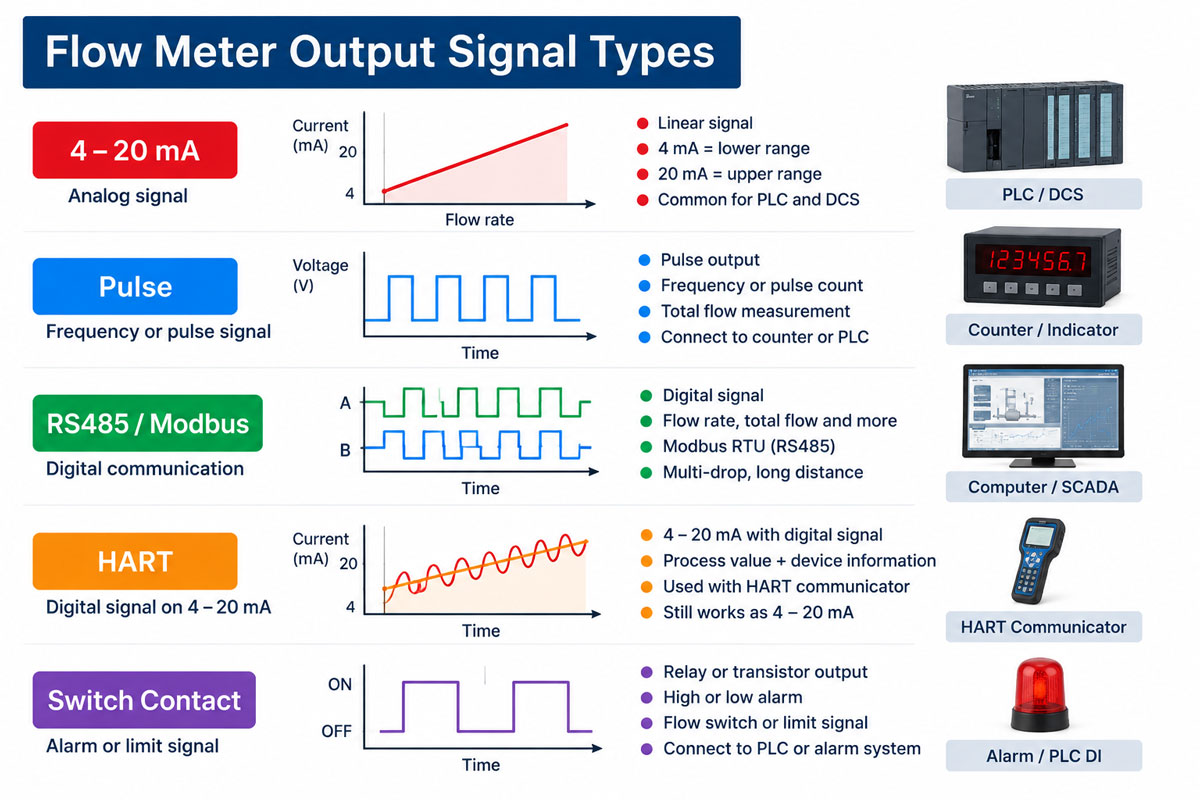
The right output depends on what the receiving system needs and how far the signal has to travel. The table below compares the five types.
| Output | What it carries | Typical cable distance | Noise immunity | Typical receiver | Watch out for |
|---|---|---|---|---|---|
| 4-20mA | One value (usually flow rate) | Several hundred metres, limited by loop resistance | High | PLC / DCS analog input | Not suitable for totals |
| Pulse / frequency | Total (each pulse = fixed quantity) | Tens to about 100 m for open-collector outputs | Medium | PLC counter input, totalizer, batch controller | Max frequency, PNP vs NPN |
| Modbus RTU (RS485) | Many values: rate, total, temperature, density, alarms | Up to about 1,200 m at low baud rates | High | PLC, SCADA, gateway, recorder | Address, baud rate, wiring polarity |
| HART | 4-20mA plus digital data on the same pair | Same as 4-20mA | High | HART-enabled DCS, handheld | Needs HART-capable input |
| Relay | On/off status | Any (switching contact) | High | Alarm, pump, valve | Contact rating |
Distances above are typical industry values; actual limits depend on cable, power supply and receiver.
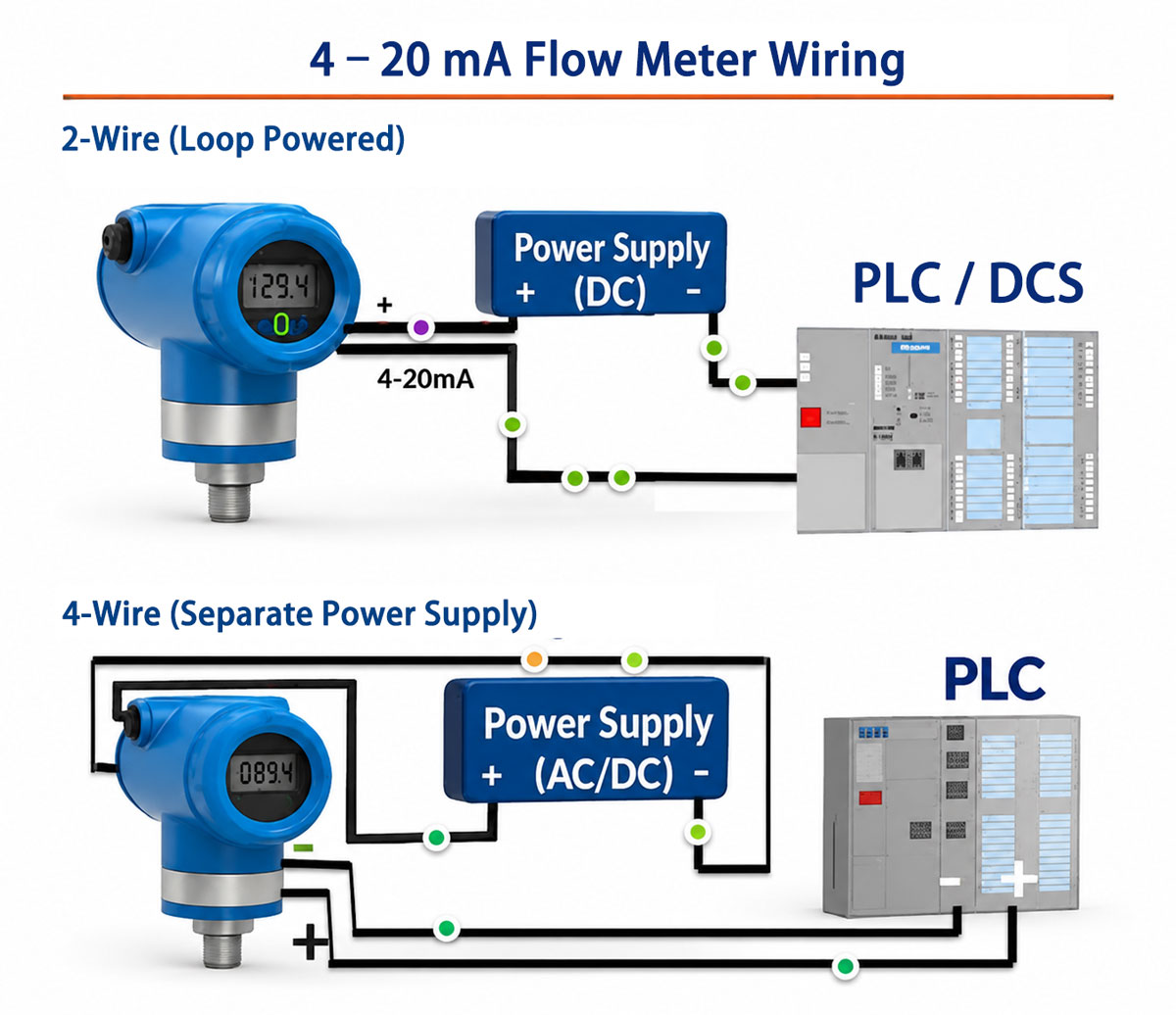
A 4-20mA output sends a current between 4 mA and 20 mA that rises in proportion to flow. In a standard setup, 4 mA means zero flow and 20 mA means the upper range value set in the transmitter.
Example: a meter is ranged 0–50 m³/h. A reading of 12 mA means (12 − 4) ÷ 16 × 50 = 25 m³/h.
Points to check before wiring:
A 4-20mA signal shows how fast the fluid is moving right now. Adding up that signal over time inside a PLC gives a total, but small offsets add up day after day, so the PLC total drifts away from the meter's own totalizer. For totals, use pulse or Modbus.
A pulse output sends one pulse for every fixed quantity that passes through the meter, such as 1 pulse per litre or 0.25 mL per pulse. The receiver counts pulses and multiplies by the pulse value (often called the K-factor) to get the total.
Pulse output flow meters are the usual choice for:
In one dosing project for a water treatment plant, the required flow was only 8–50 mL/min, so the micro flow meter's pulse value had to be small enough that the PLC still received several pulses per minute. In another, an additive dosing line specified that the pulse output must be PNP to match the existing PLC inputs.
Things to set or ask for:
Modbus RTU over RS485 is a digital link: the PLC or SCADA system (the master) asks the meter (the slave) for values held in numbered registers, and the meter replies. One twisted pair can carry flow rate, total, temperature, density, alarms and diagnostics, and one bus can connect several meters.
Settings that must match on both sides:
| Setting | Typical value | What goes wrong if it does not match |
|---|---|---|
| Slave address | 1–247, unique per meter | No reply, or two meters answering at once |
| Baud rate | 9600 or 19200 | No reply or garbled data |
| Parity / stop bits | 8-N-1 or 8-E-1 | Communication errors |
| Register map and data type | From the meter manual, e.g. SH-CMF Modbus registers | Wrong numbers (e.g. word order swapped in 32-bit floats) |
Wiring tips:
HART adds a digital signal on top of the 4-20mA loop, so the same two wires carry the analog flow rate and digital data such as totals, diagnostics and configuration. HART is useful when the plant already has HART-capable DCS inputs or handheld communicators.
Profibus-PA and Profibus-DP are fieldbus networks used in larger plants, often in Europe. Choose them only when the control system is already built on Profibus; otherwise, 4-20mA plus Modbus covers most needs at lower cost.
Flow data reaches SCADA, a PC or the cloud by one of four routes, depending on where the data must end up and what already exists on site.
| Route | Signal from the meter | Device in between | Good for |
|---|---|---|---|
| 1. Meter → PLC / DCS → SCADA | 4-20mA, pulse, Modbus or HART | PLC or DCS (already on site) | Plants with an existing control system |
| 2. Meter → SCADA directly | Modbus RTU (RS485) | RS485-to-Ethernet converter if SCADA uses Modbus TCP | Small systems with several meters and no PLC |
| 3. Meter → recorder → PC | 4-20mA or pulse | Paperless recorder with RS485 or Ethernet | Logging, reports and trends without a PLC |
| 4. Meter → cloud / phone | Pulse, Modbus or built-in GPRS | GPRS meter, or a 4G / NB-IoT gateway | Remote sites: wells, irrigation, pipelines, tank farms |
Route 3 suits sites that need records rather than control. Paperless recorders accept 4-20mA and pulse inputs, store data and send it to a PC over RS485 or Ethernet.
Route 4 suits remote sites. A GPRS electromagnetic flow meter runs on battery and sends readings over the mobile network, so no power or signal cable is needed. When the meter has only pulse or Modbus outputs, a third-party 4G or NB-IoT gateway can read it and forward the data to a cloud platform. Check that the gateway supports the meter's protocol and that the reporting interval suits the job: hourly data is fine for billing, too slow for control.
The table lists the outputs available on each series. Exact combinations depend on the model code, so state the required output in the inquiry.
| Series | Meter type | 4-20mA | Pulse | RS485 / Modbus | HART | Other |
|---|---|---|---|---|---|---|
| SHD | Electromagnetic | ✓ | ✓ | ✓ | ✓ | Profibus-DP |
| SHD-SE15 | Battery-powered electromagnetic | – | ✓ | ✓ | – | GPRS |
| SH-CMF | Coriolis mass | ✓ | ✓ (frequency) | ✓ | ✓ | Profibus-PA |
| STLU | Vortex | ✓ (2-wire) | ✓ | ✓ | ✓ | Battery-powered version |
| SLW | Liquid turbine | ✓ | ✓ | ✓ | ✓ | – |
| SGW | Gas turbine | ✓ | ✓ | ✓ | – | Temperature and pressure compensation |
| SRK | Thermal mass | ✓ | – | ✓ | ✓ | Alarm relays |
| LC | Oval gear | ✓ | ✓ | – | ✓ | Explosion-proof indicator |
| LC-M | Micro flow | ✓ | ✓ | ✓ | – | – |
| HL | Ultrasonic level | ✓ | – | ✓ | ✓ | Profibus-DP |
| SX | Paperless recorder | ✓ (retransmission) | – | ✓ | – | Ethernet, USB, relays |
In past orders, steam users often chose vortex meters with both 4-20mA and RS485, so the control room gets a fast analog rate and the energy system reads totals over Modbus.
| Symptom | Likely cause | Fix |
|---|---|---|
| 4-20mA reading jumps or is noisy | Unshielded cable, shield grounded at both ends, cable next to power lines | Use shielded twisted pair, ground the shield at one end, separate from motor cables |
| Loop reads 0 mA | Active/passive mismatch or no loop power | Check 2-wire vs 4-wire and where the 24 V DC comes from |
| PLC shows half or double the flow | Range in PLC differs from range in transmitter | Set the same upper range value in both |
| PLC total differs from meter display | Total calculated from 4-20mA, or pulses being missed | Use pulse or Modbus for totals; check pulse frequency vs input speed |
| Modbus meter does not answer | Wrong address or baud rate, A/B swapped, manufacturer protocol instead of Modbus | Match settings, swap A/B, confirm the protocol option |
| Modbus values look wrong | Wrong register or word order | Check the register table and float byte order in the manual |
Send us four details and our engineers will suggest a meter and output combination within 24 hours:
Contact our engineers with these details, or attach a photo of your PLC input card or wiring diagram.